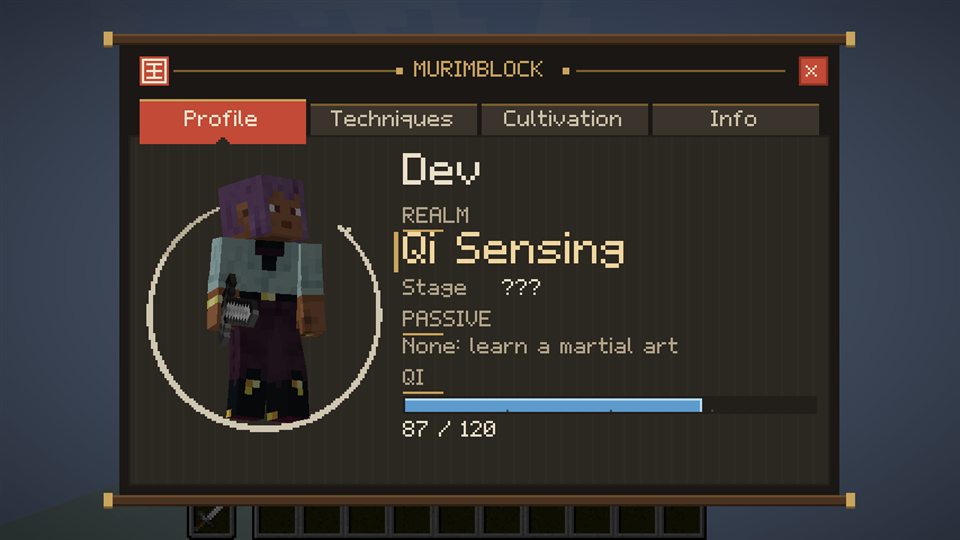
Profile: your name, realm, stage, passive and Qi
The Murim menu
Press K: Profile, Techniques, Cultivation and Info.
Press K to open the menu. It has four pages.
- Profile: your character in 3D, realm, stage, main passive and Qi.
- Techniques: your martial arts as cards, the ones you have learned first and your main style first, marked Main; an art you have not learned is a dark ??? card. Each card shows its manual and a row of small squares, gold for the passive and each technique revealed. When there are more cards than fit, arrows turn the pages. Open an art to read its techniques (a technique's page shows its icon large, its Qi and cooldown), set your four M1 strikes and fill the combat bar (click a slot to place, right-click to clear). A technique only shows once you have unlocked it.
- Under the combat bar, a gold slot shows your active passive: only one is active at a time, your main style's. Click it to open its page; open another art's passive to make that art your main style.
- Cultivation: current realm, stage, the Qi Max needed for the next stage, and the breakthrough status.
- Info: controls, your status and the Combat Settings.